Co-founder of AURUM with 3+ years of experience, driving monetization strategies and creator career growth.
Quick Takeaways
You spent an hour in Canva picking colors for your tip menu. Listed every service, priced everything at what felt fair, pinned it to your page, and set it as your welcome message. Then nothing happened. Or worse — fans saw your $15 starting rate and decided that's all you're worth. The fan who would've dropped $500 on a custom now knows your floor price. I've watched this play out across hundreds ...
What Is an OnlyFans Tip Menu (And Do You Actually Need One)?
An OnlyFans tip menu is a pinned post on your page listing custom services and prices. Fans browse, pick what they want, and tip the listed amount. But there are two types of menus on OnlyFans, and most guides blur them together. A tip menu lists services you create on request — customs, dick ratings, . A content menu organizes content already on your feed. Most people searching "OnlyFans menu" wa...
This guide covers tip menus — service lists with prices for custom requests. If you want to organize your existing feed, that's a content menu and works differently.
| Menu Type | What It Is | Example |
|---|---|---|
| Tip menu | Custom services you create on request — fans tip to order | Dick rating $10, Custom video $25/min, Sexting $50/hr |
| Content menu | Catalog of content already on your feed | Solo photos, Workout clips, Behind-the-scenes |
Most people searching 'OnlyFans menu' want a tip menu.
What to Put on Your OnlyFans Menu: Items That Actually Sell
I've managed pricing across enough accounts to know what moves. Here are the best OnlyFans menu ideas with real price ranges — not made-up examples, but what we actually see across managed accounts. The items that bring in the most money? Customs — and not the $5 ones. The $100+ per minute custom videos where a fan spells out exactly what they want. are consistently the highest earner on tip menus...
Fitness creators
Workout plan customs, progress accountability check-ins, gym outfit requests, sweat-session videos.
Cosplay creators
Character-specific photo sets, cosplay request customs, behind-the-scenes transformation content.
Couples
Couple customs, solo content from either partner, date night videos, his-and-hers requests.
Start with 5-6 items. Include customs, dick ratings, sexting, and one premium option like GFE or video calls. Add 'DM for anything not listed' at the bottom.
| Menu Item | Beginner | Mid-Tier | Top Creator |
|---|---|---|---|
| Custom photo (single) | $5-10 | $15-25 | $50-100 |
| Custom photo set (5-8) | $15-30 | $50-80 | $100-200 |
| Custom video (per min) | $5-10/min | $15-30/min | $50-100/min |
| Dick rating (text) | $5-10 | $10-25 | $25-50 |
| Dick rating (video) | $10-20 | $25-50 | $50-100 |
| Sexting (30 min) | $15-30 | $30-75 | $75-150 |
| GFE (per day) | $25-50 | $50-150 | $200-500 |
| Video call (per min) | $2-5/min | $5-10/min | $10-20/min |
| Voice message | $5-10 | $10-20 | $20-50 |
| Worn items + shipping | $30-50 | $50-80 | $80-150+ |
| Film yourself wearing the item, ship it out. — easy upsell |
Ranges based on AURUM managed creator data. Niche, audience size, and content quality all affect what you can charge.
How to Price Your OnlyFans Menu Items
Here's what most guides get wrong: they hand you a price list and move on. But the price you set isn't just a number — it's a signal. And the wrong signal costs real money. I manage chatting teams that handle thousands of DMs per month. The single biggest mistake I see? Creators charging way too little for customs. before setting menu rates. For the full breakdown on subscriptions, PPV, and custom...
Custom content costs 2-3x pre-made
If you sell a pre-made photo set for $20, a custom set starts at $40-60 minimum. The fan is getting something made just for them — that carries a premium.
Set minimums, not fixed prices
We set floors — minimum per body part shown, per minute, per content type. Chatters never go below the floor but go above it whenever a fan's spending history says they'll pay more.
Start high, adjust down
You can always offer a discount. You can't raise a price on someone who already knows your rate. This is the most repeated advice on creator forums — and it's correct.
“A 30-minute custom video for $100? That's just absurd. That's $3 per minute for content that takes real time and energy to make. Our minimum for that kind of request would be ten times higher.”
Join creators learning to earn more
Weekly chatting scripts, pricing strategies, and PPV tips — free on Telegram.
The Pricing Strategy Most Guides Won't Tell You
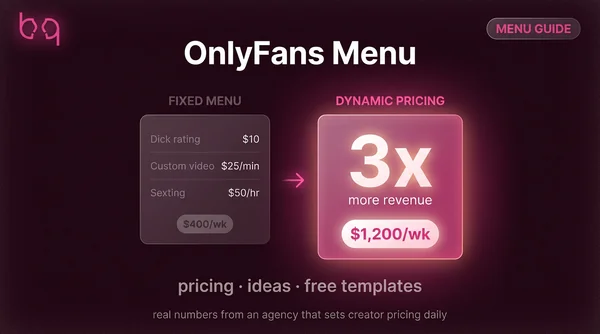
Every tip menu guide shows you prices. None explain why those numbers work — or why the highest earners skip fixed prices entirely. The creators on our roster pulling the most revenue don't have public menus. Their chatters evaluate each fan individually and price based on spending patterns. One fan pays $200 for a custom. Another pays $1,200 for the exact same thing. See for the full picture. You...
Anchor with your most expensive item first
Put the $500 GFE at the top. Everything below it looks like a bargain. Anchoring works in every industry — restaurants do this with wine lists.
Use odd pricing
$19 feels cheaper than $20. $49 beats $50. Human brains read left to right and anchor on the first digit. One dollar difference, but it shifts the whole perception.
Offer 3 tiers for popular items
Text dick rating $10, detailed rating $25, video rating $50. Most fans pick the middle — which is exactly where you want your best margin.
Bundle for bigger orders
Custom video + 3 bonus photos at a combined price beats selling separately. Bundles raise average order value and make fans feel they're getting a deal.
same 4 customs at $300 avg with dynamic pricing
revenue gap between fixed and dynamic pricing
Free OnlyFans Menu Templates (And How to Make Your Own)
Everyone wants a pretty template. That's fine — a clean menu looks professional. But a simple text post with zero graphics works just as well. The most upvoted template advice on Reddit (332 upvotes) says it straight: a text-only menu is "absolutely valid and possibly even better." Overdesigned menus feel corporate. Fans aren't here for a brand experience — they're here for you.
Canva (free)
Search 'tip menu' or 'price list' in templates. Customize colors, fonts, and items. Free tier handles everything you need.
Pinterest (free)
Search 'OnlyFans tip menu template' for visual ideas. Don't copy directly — use them as starting points.
Etsy ($5-30)
Pre-made templates that look polished. Worth it if design isn't your thing and you want something ready in 5 minutes.
8% of men have some form of color blindness. Skip red-green combos and bright text on bright backgrounds. High contrast means more fans can read your menu — which means more orders.
Open Canva and pick a clean template
Search 'menu' or 'price list.' Go minimal — no neon backgrounds, no busy patterns.
Add your 5-6 menu items with prices
Service name on the left, price on the right. One line per item. That's it.
Match your brand colors
Use colors from your OnlyFans page and socials. Consistency helps fans recognize your brand.
Download as PNG and pin to your page
Upload as a post, then pin it. Should be the first thing subscribers see on your profile.
Join creators learning to earn more
Weekly chatting scripts, pricing strategies, and PPV tips — free on Telegram.
Where to Display Your Menu (So Fans Actually See It)
The #1 complaint I hear: "Fans don't read my menu even though it's pinned." If that's you, the problem isn't your fans — it's that the menu only shows up in one place.
If fans still don't read it, that's normal. Most won't. The menu exists so YOU can reference it quickly — 'check my pinned post' is a one-line redirect that saves you from retyping prices in every DM.
Pin it to your profile
The basics. Pin your menu post so it's the first thing fans see on your page.
Set it as your welcome message
Every new subscriber gets it automatically. Settings, then Welcome Message, then paste a summary with your prices.
Mention it in your bio
Add a line like 'Custom pricing pinned to my page' or 'Check my pinned post for menu.' If your bio needs work, our guide on how to covers exactly what to include.
Reference it in DMs
When fans ask what you offer, send them to the menu instead of retyping: 'Check my pinned post — customs and prices are all there.'
Drop reminders in regular posts
Once a week, mention it. 'New here? Custom pricing is pinned to my page.' Keeps it visible for fans who missed the welcome message.
How Tipping Actually Works on OnlyFans
This is the section no other guide covers. Understanding how tipping works from the subscriber side helps you price smarter and avoid awkward situations. Per the , the platform takes 20% of all transactions including tips. A $100 tip means $80 in your pocket. In 2024, OnlyFans processed — with $5.8 billion paid out to creators after that 20% cut.
Tips are not custom orders
A fan tipping $20 doesn't earn them a request. Tips are appreciation — like tipping a waitress. Set this boundary early: 'Tips without a prior DM are treated as gifts.'
Confirm orders BEFORE they tip
Have fans message you first, agree on price and details, then send the tip. This stops the 'I tipped so where's my custom' problem cold.
New fan tip caps affect your menu
New subscribers max out at $100 per transaction for 4 months. If your premium GFE is $150, they need two tips — or just handle it through DMs instead.
Put this on your menu, bio, and welcome message: 'Please DM before tipping for customs. Tips sent without discussion are considered gifts.' One line prevents most tip arguments.
| Tipping Detail | How It Works |
|---|---|
| Minimum tip (credit card) | $5 |
| Minimum tip (OF wallet) | $1 |
| New account cap (first 4 months) | $100 per transaction |
| After 4 months | $200 per transaction |
| Platform cut | 20% — you keep 80% |
| Non-subscribers tipping? | Only on free pages or during live streams |
These limits directly affect what you can put on your menu.
Join creators learning to earn more
Weekly chatting scripts, pricing strategies, and PPV tips — free on Telegram.
5 Tip Menu Mistakes That Kill Your Revenue
I've reviewed hundreds of menus from creators applying to work with us. These mistakes show up constantly — and they're all fixable. The biggest one is pricing. It's exactly for managed accounts, and the gap between DIY pricing and agency pricing is where most revenue gets left behind.
Live Stream Tip Menus: How They Work Differently
Live stream menus aren't the same as profile tip menus. During a stream, you're selling real-time actions — things you'll do on camera right now for tips. If you stream regularly, make a separate menu just for live sessions. Keep it to 3-4 actions with flat prices. Pin it in chat or show it on screen.
Think of streaming as a relationship tool. The real money comes when stream regulars convert into custom buyers. Your stream menu gets them in the door — your DM pricing closes the deal.
Mistakes to Avoid
Pricing customs too low
A 30-minute custom video for $100 is $3 per minute. You wouldn't freelance for that rate. Start higher than you think — you can always offer a discount, but you can't raise a price on someone who already knows your floor.
Listing 15+ menu items
If fans need to scroll your menu, it's way too long. Stick to 5-6 items and add 'DM for anything not listed' at the bottom. A restaurant with 200 dishes is confusing — same rule applies here.
Overdesigned graphics nobody can read
Bright text on bright backgrounds, tiny fonts, neon everything. 8% of men have some form of color blindness. High contrast and readable fonts beat a pretty design that nobody can parse.
Never updating your prices
What worked at 100 subscribers shouldn't be the same at 1,000. Your prices should grow with your audience. If you're overwhelmed with orders, your prices are too low.
Overthinking before you even start
Posting 3, 4, 5 drafts asking for feedback before you've even started promoting. Your first menu doesn't need to be perfect. It needs to exist. Ship it and adjust based on what actually sells.
Frequently Asked Questions
A tip menu is a pinned post on your OnlyFans page that lists custom services with prices. Fans browse it and send a tip for the item they want. It's different from a content menu, which organizes what you've already posted on your feed.
Create a post listing your services and prices — either as a text post, in Canva, or using a template. Publish it, pin it to your page, and add it to your welcome message so new subscribers see it right away.
Custom content should cost 2-3x similar pre-made content. Custom photo sets typically run $40-100, custom videos $15-100+ per minute, and dick ratings $5-50 depending on your audience size and niche.
No. Some top-earning creators skip menus entirely and price each request based on the fan's spending history. A menu helps beginners communicate what they offer, but it's a starting point — not a requirement.
$5 by credit card, $1 from the OnlyFans wallet. New accounts are capped at $100 per transaction for the first 4 months, then $200 after that.
Either works. Text menus feel more personal and authentic. Designed templates look polished. Pick what matches your brand — but keep it under 6 items regardless.
Review it every time your subscriber count doubles or when fans keep asking for something not on the menu. At minimum, update pricing every 2-3 months as your audience grows.
A tip menu lists custom services fans can request and pay for via tips. A content menu organizes what you've already posted on your feed. Most people searching for OnlyFans menu want a tip menu for customs.
Summary
Your tip menu is a starting point, not the end goal. It gives new fans a clear picture of what you offer and what it costs — and that alone puts you ahead of most creators who wing it. But the real earnings jump happens when you move past fixed prices. Learn what each fan will pay and price from there. The creators earning the most on our roster don't have a public price list — their chatters hand...
Join creators learning to earn more
Weekly chatting scripts, pricing strategies, and PPV tips — free on Telegram.
Ready to Maximize Your Earnings?
Our chatting team handles pricing, upselling, and customs for creators earning $5K+/month.