Content creator with 1 year at AURUM, specializing in content strategy, niche development, and creator wellness.
Quick Takeaways
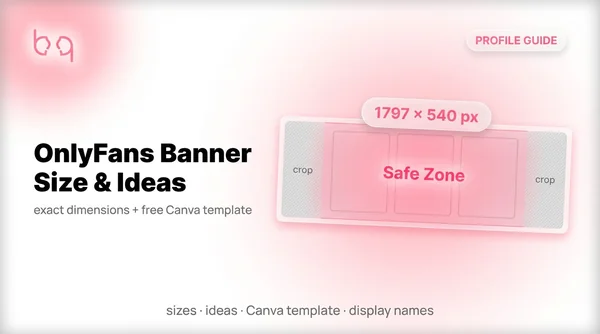
The right OnlyFans banner is 1797 × 540 pixels, uses a multi-image collage, and keeps your face in the center 60%. Your OnlyFans banner is the first thing potential subscribers see. And most creators waste it. Search "OnlyFans banner size" and you'll find five different answers — 731×204, 1168×204, 1797×540, 1900×480. Pick the wrong one and your banner gets cropped on mobile. Face cut off. Text mi...
OnlyFans Banner Size: The Only Dimensions You Need
Every guide online gives different OnlyFans banner dimensions. That's because Your OnlyFans header image displays at different sizes depending on the device — and older guides still cite numbers from 2021. Here's what actually matters: upload at 1797 × 540 pixels and you're covered. That's 3x the desktop display size, so it stays sharp on retina screens and gives OnlyFans enough resolution for eve...
Just use 1797 × 540 pixels. It's the recommended upload size that works on desktop and mobile. Don't overthink it.
| Spec | Size | Notes |
|---|---|---|
| Desktop display | 599 × 180 px | What visitors see on laptop/desktop |
| Recommended upload | 1797 × 540 px (3x) | Use this — sharp on every device |
| Mobile display | 390 × 180 px | Sides get cropped ~313px each |
| Legacy dimension | 1168 × 204 px | Still works but lower quality |
| Max file size | 2 MB | JPEG or PNG only — no GIF or video |
| Aspect ratio | 3:1 to 3.33:1 | Landscape orientation always |
of your banner is the mobile safe zone — keep faces and text centered
cropped from each side on mobile (on a 1797px banner)
maximum file size for OnlyFans banner uploads
OnlyFans Banner Ideas That Actually Convert
The biggest mistake I see? Creators using their banner for a logo, a quote, or some random graphic instead of photos of themselves. A creator making $27K/month put it bluntly on Reddit: your banner should always be photos of you — not a logo, not a quote, not a random graphic. Your banner is your top digital real estate — treat it like a menu photo, not a billboard. The OnlyFans cover photo ideas ...
Multi-image collage (best for most creators)
Stitch 3-4 of your best photos into a horizontal collage using Canva. Having multiple images increases the chance a viewer connects with at least one. This is the strategy the highest-earning creators on Reddit swear by.
Fitness and athletic
Gym shots, active poses, workout outfit previews. Show your physique in action — not just a static mirror selfie. Athletic banners work because they preview a lifestyle, not just a body.
Faceless creators
You don't need to show your face. Body shots from behind, feet, side-lying beach photos, masked or hat-and-sunglasses looks all work. One faceless creator shared that her booty-out photo banner outperformed everything else she tried. Check our for more angles.
Cosplay and themed
Character-inspired outfits, set pieces, and creative costumes. Cosplay banners grab attention because they break the pattern of typical creator photos.
Couples
Show chemistry — not just two people standing next to each other. Playful poses, matching aesthetics, or a split-frame collage work well for .
Male creators
Athletic shots, lifestyle moments, and confident poses. The same rules apply: multiple images beat a single photo. Don't waste your banner on a shirtless bathroom mirror selfie — it screams lazy.
Text and CTA overlay
Adding "50% off this week" or a short tagline over your collage can boost clicks. But update it often or it looks stale. One line of text beats three every time.
Pinterest trick: search "Twitter banner" on Pinterest to find collage layouts that look amateur and authentic. These actually convert better than polished designs because they feel real.
How to Make an OnlyFans Banner in Canva (Free)
is the go-to OnlyFans banner generator — free, no design skills needed, and it has built-in safe zone guides. You don't need a Pro account. Here's the exact process I use.
Save your Canva banner as a template. When you want to update it for a promo or seasonal content, you can swap photos without rebuilding from scratch. Canva's free brand kit feature lets you save your colors and fonts too.
Open Canva and set custom dimensions
Go to canva.com, click "Create a design," then "Custom size." Enter 1797 as width and 540 as height. This gives you the exact OnlyFans upload dimensions.
Upload 3-4 of your best photos
Drag your photos into the canvas. Pick shots that show different angles or vibes — one close-up, one full-body, one personality shot. If you're a faceless creator, use body shots, detail photos, or lifestyle images.
Arrange in a collage layout
Split the canvas into 3-4 vertical sections and place one photo per section. Keep the most eye-catching image in the center — that's the safe zone that shows on every device.
Add text if you want (optional)
A short CTA like "Subscribe for daily posts" or "50% off today" can boost conversions. Use bold, simple fonts. Keep text in the center 60% so it doesn't get cropped on mobile.
Export as PNG and check file size
Click "Share" then "Download" and select PNG. If the file is over 2 MB, switch to JPG or lower the quality slightly. OnlyFans rejects anything over the size limit.
Upload and preview on both devices
Go to your OnlyFans settings and upload the banner. Then open your page on your phone — if your face or text got cut off, go back to Canva and adjust the layout.
Get weekly content strategies
Chatting scripts, niche breakdowns, and creator playbooks — free on Telegram.
OnlyFans Banner Rules: What Gets Approved (and Rejected)
OnlyFans doesn't allow nudity in banners, cover photos, or your OnlyFans background. That part is clear. What's not clear is where the line sits — because enforcement is inconsistent. I've seen lingerie banners get approved on one account and rejected on another. One creator on Reddit had a photo of her literally canoeing rejected for being "sexual." Meanwhile, more revealing images slide through ...
OnlyFans uses automated moderation for banners with different rules than your regular content. A photo that's fine as a locked post might get rejected as a banner. Don't assume the same standards apply.
“I literally had the most PG thing — a picture of me canoeing — and they still take it down. WTF?!”
5 OnlyFans Banner Mistakes Killing Your Conversions
Your banner either helps people subscribe or gives them a reason to scroll past. Here are the mistakes I see on almost every new creator's page.
Using a logo or graphic instead of photos
Your subscribers want to see YOU — not your brand identity. A popular Reddit post with 136 upvotes said it perfectly: "MEN ARE VISUAL — using your banner for anything other than you is a waste." Save the logos for Twitter.
A random fully-clothed photo with no thought
The opposite extreme. Throwing up a regular selfie from your camera roll doesn't convert either. Your banner should preview the vibe and quality of your content — something that makes someone curious enough to subscribe.
Ignoring mobile cropping
Your banner might look perfect on desktop, then chop off your face on mobile. Most OnlyFans traffic comes from phones. If you haven't checked your banner on your phone, you probably have a cropping problem right now.
Cramming too much text
A short CTA is fine. But three lines of text, your social handles, and a watermark? Cluttered and cropped. One line, max 5-6 words, centered.
Never changing your banner
A stale banner from 6 months ago tells visitors you're not active. Swap it every 1-3 months — especially when running promotions or seasonal content.
Get weekly content strategies
Chatting scripts, niche breakdowns, and creator playbooks — free on Telegram.
OnlyFans Username vs Display Name: What's the Difference
These two get confused constantly. OnlyFans usernames and display names are separate fields, show up in different places, and follow different rules. Getting them wrong affects your banner because your display name overlays the bottom of it.
Keep your OnlyFans username simple and memorable
Something fans can type easily and remember. If you're a personality-based creator like GovGurl or Igor, match your username to that identity. If you're more of an influencer, go with your name plus a made-up last name — like how Sophie Rain did it. For 200+ ideas and a naming formula, check our .
Your display name is marketing real estate
For OnlyFans display name ideas, add a hook alongside your name — "50% off today" or "New content daily." It overlays your banner, so keep it short enough that it doesn't block your photos. And check our to avoid banned terms.
Test how your name looks on your banner
Upload your banner and check how your display name sits over it. Long display names with emoji can cover a surprising chunk of the bottom-left corner. Adjust your banner layout or shorten your name if needed.
Your OnlyFans pfp (profile picture) also overlays the bottom-left of your banner. Design your banner with that circle in mind. For a deep dive on choosing the right profile picture, check our .
| Username | Display Name |
|---|---|
| What it is | Your unique @ handle |
| The name shown on your profile | Where it shows |
| URL (onlyfans.com/username) | On your profile, overlaying the banner |
| Character limit | 4-24 characters |
| Up to 80 characters | Can you change it? |
| Yes, in settings (limited) | Yes, anytime |
| Characters allowed | Letters, numbers, underscores, periods |
| Almost anything including emoji | Example |
| @kimchi, @sophierain | Sophie Rain, Kimchi Baby |
OnlyFans username vs display name comparison
When to Update Your OnlyFans Header (and How Often)
You don't need to swap your banner every week. But leaving it untouched for months isn't great either. Here's the schedule that works.
Testing banner conversions only matters at $10K+ per month. Below that, just pick your best photos, use the collage layout, and focus on driving traffic instead of obsessing over page tweaks.
conversion lift from a single banner swap on a high-earning account
recommended banner update frequency for active creators
monthly revenue difference from a 2% conversion lift at $50K/month
Frequently Asked Questions
Upload your OnlyFans banner at 1797 × 540 pixels — that's the recommended header image for OnlyFans. That's 3x the desktop display size (599 × 180) and stays sharp on every device. Keep important elements in the center 60% since mobile crops the sides.
No. OnlyFans only supports JPEG and PNG images for banners. There's no option for animated GIFs or video headers. Your banner must be a static image under 2 MB.
PNG gives the best quality for banners with text or sharp edges. JPEG works fine for photo-only banners and produces smaller files. Both need to be under 2 MB.
Every 1-3 months is a solid baseline. Change it more often when running promotions, seasonal content, or if your conversion rate drops. Stale banners signal an inactive page.
Your username is your unique @ handle that appears in your URL. Your display name is shown on your profile page and overlays the bottom of your banner. You can change your display name anytime, but username changes are limited.
Yes. Canva offers free OnlyFans template options — create a custom design at 1797 × 540 pixels and start from their collage layouts. Reddit's r/onlyfansadvice also has creator-made templates. Etsy sells pre-designed ones for $5-15.
Fansly banners are 1168 × 204 pixels with a 5.7:1 aspect ratio — much wider and thinner than OnlyFans. You can't reuse the same banner across both platforms without cropping. See our for more differences.
OnlyFans uses automated moderation for banners that's stricter and less consistent than regular content review. Even PG-rated images get flagged sometimes. Try uploading a slightly different version — small changes in skin exposure or framing often get approved on the second try.
Summary
Your OnlyFans banner is worth getting right. Upload at 1797 × 540 pixels, keep your face and text in the center 60%, and use a multi-image collage — not a logo, not a random selfie. If you want the full profile setup from bio to first post, our walks through every step. And if your content strategy needs professional help, that's exactly what we do.
Get weekly content strategies
Chatting scripts, niche breakdowns, and creator playbooks — free on Telegram.
Need Help Making Your Profile Convert?
AURUM's team tests banners, bios, and profiles daily. Apply and let us handle the optimization while you focus on creating.