Content creator with 1 year at AURUM, specializing in content strategy, niche development, and creator wellness.
Quick Takeaways
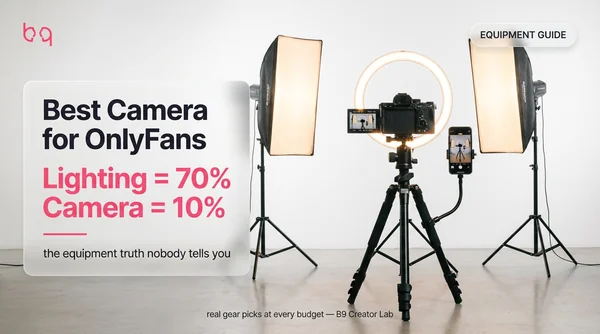
You're about to drop $500 on a camera for OnlyFans. Don't. I've been creating content for over two years, and here's what nobody tells you — your camera is responsible for about 10% of your content quality. Lighting does 70% of the heavy lifting. I tested this myself with a $50 softbox set and my phone, and the photos beat my friend's $1,200 mirrorless setup with zero lighting. This guide covers t...
Do You Actually Need a Camera for OnlyFans?
Every equipment guide starts with camera recommendations. This one starts with the truth. I wasted three months researching cameras when I started creating. Compared every spec, almost dropped $800 on a Sony. Then a friend who'd been at it for a year told me she still shot on her iPhone. She made $6K/month. Content quality breaks down into four parts — and your camera is the smallest one. Lighting...
If your content looks bad, the fix is almost never a better camera. Buy a $50 softbox set. It'll transform your phone photos overnight.
Best Phone Camera Tips for OnlyFans (The $0 Setup)
Most OnlyFans photography starts on your phone. And honestly? Most should stay there longer than they think. I shot my first six months of content on an iPhone 13. No camera, no fancy gear. Just my phone, natural light from a window, and a cheap tripod. The content looked good enough to build 400 subscribers and clear $2K/month. But there's a catch — you have to use your phone the right way. Here'...
Always use the back camera
Your phone's rear camera is dramatically better than the selfie camera — sharper sensor, better low-light performance, wider dynamic range. The fix for not seeing yourself: prop a mirror behind your tripod. Or use AirPlay to cast your screen to a TV or second device.
Shoot in 4K, post in 1080p
Set your phone to 4K/30fps in settings. This gives you room to crop and reframe in editing without losing sharpness. OnlyFans compresses uploads to 1080p anyway, so the extra resolution is for editing flexibility — not the final file.
Lock exposure and focus
Tap and hold on your face in the camera app until you see AE/AF Lock. This stops your phone from constantly readjusting brightness and focus mid-shoot. It's the difference between consistent footage and that flickering auto-adjust look.
Use portrait mode for photos
Portrait mode adds background blur that makes phone photos look like they came from a $2,000 camera. On iPhone, keep the blur around f/2.8 — lower than that and it starts looking fake around your hair edges.
Get a $10 Bluetooth remote
A wireless shutter button changes everything for solo creators. No more running back and forth to hit the timer. Just pose and click. I keep three of them charged because I've been mid-shoot when one died.
| Phone | Best Feature | Video | Price Range |
|---|---|---|---|
| iPhone 15/16 Pro | Cinematic Mode + ProRAW | 4K/60fps | $999-1,199 |
| Samsung Galaxy S24 Ultra | 200MP sensor + Nightography | 8K/30fps | $1,199 |
| Google Pixel 9 Pro | AI processing + Night Sight | 4K/60fps | $999 |
| iPhone 13/14 (non-Pro) | Still excellent for content | 4K/60fps | $399-599 used |
Any phone from 2021 or newer is good enough for OnlyFans content
Best Cameras for OnlyFans Under $500
Looking for the best budget camera for OnlyFans? This is the tier — where you go when your phone isn't cutting it — usually because you need better low-light performance or more control over background blur. If I had to pick one camera under $500, it's the Canon EOS M50 Mark II. Flip screen for self-shooting, decent 4K video, and face-tracking autofocus. But here's the full comparison. For more on...
Buy used. Camera bodies lose 30-40% of their value in the first year but barely lose quality. Check eBay, Facebook Marketplace, or B&H Photo's used section.
| Camera | Price | Best For | Video | Our Take |
|---|---|---|---|---|
| Canon EOS M50 Mark II | ~$499 | Best all-rounder | 4K/24fps | Flip screen, solid autofocus. The starter camera I'd pick today. |
| Nikon D3500 | ~$399 | Photos on a budget | 1080p/60fps | Great photo quality, lightweight. No 4K — skip if video matters. |
| Canon EOS Rebel T7 | ~$449 | Canon lens ecosystem | 1080p/30fps | Reliable photos, weak video. Only if you already own Canon lenses. |
Prices as of February 2026. Used deals can save 30-40%.
Best Cameras for OnlyFans: $500 to $1,000
This is the sweet spot — cameras built specifically for content creators. Flip screens, fast autofocus, clean 4K video, and compact bodies you can toss in a bag. The Reddit creator community swears by mirrorless cameras in this range. And I agree — they're lighter than DSLRs, quieter (no mirror slap during video), and way better for filming. If you want to go deeper on the video side, see our .
The Sony ZV-E10 II is the camera I recommend to every creator who asks. It was designed for solo content creation — the product showcase mode blurs your background instantly, and the directional mic cuts out noise behind the camera.
“When the time finally comes to invest in a camera, always go to mirrorless.”
| Camera | Price | Best For | Video | Key Feature |
|---|---|---|---|---|
| Sony ZV-E10 II | ~$700 | Best overall for creators | 4K/30fps | Built for vlogging — flip screen, directional mic, background blur toggle |
| Canon EOS R50 | ~$679 | Compact + versatile | 4K/30fps | Tiny body, excellent autofocus, great for both photo and video |
| Fujifilm X-S20 | ~$899 | Film-look video | 6.2K/30fps | Built-in film simulations that look incredible without editing |
All three have flip screens and face-tracking autofocus — must-haves for solo creators
Get weekly content strategies
Chatting scripts, niche breakdowns, and creator playbooks — free on Telegram.
Best Cameras Over $1,000: When Pro Gear Makes Sense
I'm going to be honest — most OnlyFans creators don't need a camera over $1,000. The visible difference between a $700 Sony ZV-E10 II and a $2,500 Sony A7 IV won't show up in your subscriber count. But if you're earning $5K+/month consistently and want studio-quality production — or you're building a brand beyond OnlyFans — here's what the pros use:
| Camera | Price | Best For | Video | Why It's Worth It |
|---|---|---|---|---|
| Sony A7 IV | ~$2,500 | All-around pro | 4K/60fps | Full-frame sensor, insane low-light, cinematic depth of field |
| Sony A7C II | ~$2,100 | Compact full-frame | 4K/60fps | Same quality as A7 IV in a smaller body — easier to set up |
| Panasonic Lumix GH6 | ~$1,500 | Video-first | 5.7K/60fps | Best video specs for the price, internal ProRes recording |
Pro cameras only make sense for creators earning $5K+/month consistently
Best Webcams for OnlyFans Live Streaming
Live streaming needs different gear. You want a camera that sits on your monitor, handles changing light, and looks sharp in real time without editing. Webcams also work for video calls with subscribers and live show content. Three options worth considering: If you're planning to cam on Chaturbate or Stripchat alongside OnlyFans, check our for the dual-use equipment workflow.
| Webcam | Price | Resolution | Best Feature | Our Take |
|---|---|---|---|---|
| Logitech Brio | ~$140 | 4K/30fps | Great low-light performance | The best webcam for OnlyFans streams. Period. |
| Logitech C920S | ~$60 | 1080p/30fps | Reliable + privacy shutter | Budget pick. Gets the job done without any frills. |
| Razer Kiyo | ~$80 | 1080p/30fps | Built-in ring light | Convenient if you don't have a separate light, but the ring is small. |
Pair any of these with OBS Studio (free) for better stream control
OnlyFans Lighting Setup: Where 70% of Quality Comes From
This section matters more than every camera recommendation above it combined. I've seen creators with $2,000 cameras produce dark, grainy, unflattering content because they shot in bad light. And I've seen iPhone creators with $80 worth of softbox lights produce photos that look professional. Lighting isn't just important. It's the single biggest factor in how your content looks. Whether you're lo...
Start with a ring light ($50-80)
An 18-inch ring light is the standard first purchase. One light, one stand, usually comes with a phone mount. Good for close-ups and selfie-style content. Make sure you get 18 inches minimum — the 10-12 inch ones are basically useless for anything beyond headshots.
Upgrade to softboxes when you're ready ($80-120 for a pair)
Two softbox lights give more flattering, diffused coverage for full-body content. They spread the light so you don't get harsh shadows or that ring-light reflection in your eyes. This was the single upgrade that improved my content the most.
Natural light is free and underrated
A window with indirect sunlight is one of the best light sources you'll ever find. I still use it for most of my photos. Face the window, angle yourself slightly, and you get soft, warm light that flatters every skin tone. The catch: it disappears in winter and after sunset.
3-point lighting for a serious setup
Key light in front (slightly above), fill light to the side (softer), backlight behind to separate you from the background. Sounds complicated but it's just three lights on stands — about $200 for a budget version. This is what studios use.
Ring lights don't work for everyone. If you have pale skin or find the circular eye reflection distracting on video, softbox lights produce a more natural look. Test with natural window light first before buying anything.
“I don't use ring lights. I have two but I look like a Victorian ghost with them.”
| Price | Type | Best For |
|---|---|---|
| Neewer 18-inch Ring Light | $50-80 | Ring light |
| Close-ups, getting started | Neewer 2-Pack Softbox Kit | $80-120 |
| Softbox | Full-body shots, video | Neewer 2-Pack LED Panels |
| $70-100 | LED panel | 3-point setups, background light |
| NANLITE PavoTube II | ~$100 | LED tube |
| Accent lighting, mood shots |
Start with a ring light. Upgrade to softboxes when ring light isn't enough.
Get weekly content strategies
Chatting scripts, niche breakdowns, and creator playbooks — free on Telegram.
Tripods, Mics, and the Equipment You Actually Need
Cameras and lights get all the attention. But the best tripod for OnlyFans, the right mic, and a $8 remote are what actually make solo content creation possible. I've learned this the hard way — showing up to a shoot without a charged Bluetooth remote, or realizing my tripod doesn't reach high enough for the angle I want. Here's the gear that rounds out your setup. If you create audio content like...
| Item | Price | Why You Need It |
|---|---|---|
| Bluetooth selfie remote | $8-15 | Hands-free shutter. Essential for solo creators. Buy 2-3 as backups. |
| Phone tripod with mount | $20-30 | Basic stability. Get one that reaches at least 50 inches. |
| Gooseneck phone arm | ~$20 | Clips to headboard or desk. Perfect for overhead and bed angles. |
| Full-size tripod (for cameras) | $30-50 | Sturdier base. Get one with a ball head for quick angle changes. |
| Lavalier mic (clip-on) | $15-30 | Clips to clothes. Way better audio than phone mic for talking content. |
| Blue Yeti Nano | $80-100 | For ASMR, dirty talk, JOI, or any audio-focused content. |
| Colored bedsheets | $20-30 | Double as backdrops. Rotate colors for variety. |
How to Shoot OnlyFans Content by Yourself
This is the question I see in every creator forum. And it's the biggest pain point for solo creators — your tripod's on the floor but you're on the bed, you can't see the frame because your back camera faces away, and the timer runs out before you're in position. Here's the system I use. It took a few months to figure out, but now I batch a full week of content in one 30-minute session. For angle ...
AURUM creators only handle one thing: content creation. We take care of DMs, promotion across 5+ platforms, content calendars, and pricing strategy. Most of our creators batch-shoot once or twice a week and spend zero time on the business side.
Set up your back camera on a tripod
Position your phone's rear camera at the angle you want. Full-height tripod for standing shots, gooseneck arm for bed content, mini tripod on a shelf for overhead angles.
Place a mirror behind the tripod
A cheap full-length mirror ($15) behind your tripod lets you see the frame without switching to the front camera. You'll see exactly what the phone sees — just look at the mirror while posing.
Connect your Bluetooth remote
Pair a wireless shutter remote with your phone. Keep it in your hand or tape it within reach. One click fires the shutter — no timers, no running back to the phone.
Lock focus and exposure before shooting
Step into frame, tap and hold the screen to lock AE/AF. This prevents the camera from refocusing or readjusting brightness every time you move.
Batch everything — change outfits, not setups
Keep the lighting and camera position the same. Swap outfits 5-10 times. One 30-minute session can produce 30+ photos and several video clips — enough for a full week.
Full OnlyFans Equipment Checklist by Budget
Here's all the equipment needed for OnlyFans in one table. Find your budget tier and start there. For the full picture — including monthly subscriptions, promotion costs, and — see our complete cost guide. You can always move up later — and you should wait until you're earning enough to justify it. Every successful creator I know started cheap and reinvested.
Don't skip tiers. Creators who jump straight to a $1,000 setup with zero subscribers usually quit within two months. Start small, prove the concept, reinvest earnings. That's how every successful creator I know built their setup.
| Budget | Camera | Lighting | Accessories | Total |
|---|---|---|---|---|
| $0-50 | Your phone | Natural window light | Bluetooth remote ($10) | ~$10 |
| $50-150 | Your phone | 18-inch ring light ($60) | Phone tripod + remote ($35) | ~$95 |
| $150-400 | Your phone | 2x softbox lights ($100) | Tripod + gooseneck + mic ($75) | ~$175 |
| $500-1,000 | Sony ZV-E10 II ($700) | 2x softbox lights ($100) | Tripod + remote + mic ($75) | ~$875 |
| $1,000+ | Sony ZV-E10 II ($700) | 3-point LED setup ($200) | Full tripod + shotgun mic + backdrops ($170) | ~$1,070 |
Start with the tier that matches your current earnings. Upgrade when content earns more than equipment costs.
Mini Case Study: Phone-Only to $8K/Month in 90 Days
New creator, no prior content experience, iPhone 14 Pro
Started OnlyFans with just her iPhone and a messy apartment. No ring light, no tripod, no editing software. Posted inconsistently using the front camera.
Bought a $50 ring light and $8 Bluetooth remote in week 2. Switched to back camera with mirror trick. Started batch shooting 20+ photos every Sunday using natural window light. Spent $0 on a dedicated camera.
Mistakes to Avoid
Buying a camera before buying lights
The single most common equipment mistake. A $1,000 camera in bad lighting looks worse than a phone with two $60 softboxes. Lighting is 70% of your content quality — always buy lights first.
Using a GoPro for content creation
GoPros overheat after about 15 minutes at 4K and shut off mid-shoot. The wide-angle lens also distorts your body unfavorably. If you want an action camera for POV content, get the DJI Osmo Action 4 instead.
Only using the front camera on your phone
Your phone's back camera is dramatically better — sharper lens, better sensor, real optical zoom. Use a Bluetooth remote + mirror trick or AirPlay to monitor the shot while filming with the back camera.
Buying a tiny ring light and expecting studio results
Those 6-8 inch ring lights from Amazon are basically useless for anything beyond selfies. You need at least an 18-inch ring light for upper body, and even then, softboxes are better for full-body content.
Spending on gear instead of getting help with the business side
Creators drop $1,000 on cameras and lights but won't invest in the stuff that actually grows their income — DM strategy, promotion, pricing. The best setup in the world doesn't matter if nobody sees your content. Gear is 10% of the equation. Strategy and promotion are the other 90%.
Frequently Asked Questions
No. Most successful creators start with their phone and upgrade later. An iPhone 13 or newer shoots 4K video that's more than enough for OnlyFans. Your money is better spent on lighting first — it makes 10x more difference than your camera.
It varies wildly. Some top earners still shoot on iPhones. Creators who upgrade typically pick the Sony ZV-E10 II or Sony ZV-1 II for video-focused content, or the Canon EOS M50 Mark II for a photo-video balance. The camera matters less than lighting and composition.
For OnlyFans video quality, 1080p at 60fps is perfectly fine for most content. 4K looks slightly sharper but creates huge files that take longer to upload. Shoot 4K only for premium PPV content you're charging $20+ for.
Start with a single 18-inch ring light ($50-80) for face and upper body shots. Upgrade to two softboxes ($80-120 for a pair) when you're ready — they give softer, more flattering light for full-body content. Natural window light during golden hour is free and looks incredible.
The Logitech Brio ($130-170) is the best overall pick with true 4K resolution. For a budget option, the Logitech C920S ($60-70) is the industry standard. The Razer Kiyo has a built-in ring light which is handy for quick streams.
Get a phone tripod and a Bluetooth selfie remote ($8). Use your phone's back camera (way better quality than front) and monitor the shot through AirPlay to a TV, or use the mirror trick — place a mirror behind the phone so you can see the screen. Set a 3-second timer as backup.
Always go mirrorless. DSLRs are heavier, louder (the mirror slap), and worse for video. Mirrorless cameras like the Sony ZV-E10 II or Canon R50 are lighter, silent, and built for video content. DSLRs are older technology at this point.
Start at $0-50 (your phone + a Bluetooth remote). Your first real purchase should be lighting ($50-80 ring light). A dedicated camera only makes sense after you're earning consistently — budget $500-700 for a solid mirrorless like the Sony ZV-E10 II. Total starter kit: $100-150 covers everything you need.
Summary
The best camera for OnlyFans is the one you already own — as long as you've got proper lighting behind it. I've seen creators with $2,000 setups produce worse content than an iPhone with a $50 softbox. Start with your phone, a ring light, and a Bluetooth remote. Batch your shoots. Use the back camera. Once you're earning enough to reinvest, the Sony ZV-E10 II is worth every dollar. But gear is jus...
Get weekly content strategies
Chatting scripts, niche breakdowns, and creator playbooks — free on Telegram.
Phone-Only to $8K/Month — $58 in Equipment
Gear isn't what's holding you back. AURUM handles content strategy, shooting schedules, DMs, and promotion — so you can focus on creating. One creator hit $8K/month with just her iPhone and a ring light.